3DPrinting: Difference between revisions
| Line 9: | Line 9: | ||
There is a Windows PC that connects to the 3D Printer. | There is a Windows PC that connects to the 3D Printer. | ||
* June 2013 - it is currently fried. Follow the [[Talk:3DPrinting#Status_of_the_3D__Printer_PC_25|discussion page]] | |||
== Files == | == Files == | ||
Revision as of 02:10, 27 June 2013

Overview
Hardware
We currently have the following 3D printers:
There is a Windows PC that connects to the 3D Printer.
- June 2013 - it is currently fried. Follow the discussion page
Files
- smb://space/sudoroom public data/Projects/3DPrinting - Preferred place to store files
- Github: https://github.com/sudoroom/ComicsArtSudoRoom - same as Gittorious
- Gittorious - same as github https://gitorious.org/sudoroom-art-projects
Documentation
Documentation for Beginners
We currently don't have great documentation right now that covers turning on a printer, connecting it to the computer, calibration, and setting it up. We are working on that.
The current documentation / comic on the printer bed calibration is also out of date, since we have a new printer bed. Romy is compiling a 3D Printing for Beginners page on both SudoRoom and Noisebridge Wiki https://noisebridge.net/wiki/3DPrintBeginners
Overview
Quick and dirty overview
- Turn on the 3D Printer (switch is on the back right side)
- Make sure the 3D Printer is connected by USB to the desktop
- Start the program Repetier-Host http://www.repetier.com/documentation/repetier-host/
- Calibrate the printer
- Load your STL file (model of the 3D Printout)
- Slice the STL file into G-Code
- Post-Print - remove from the 3D printer bed with a razor
Gallery of Creations
-
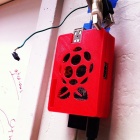 RaspBerry Pi print-out
 -
 Our Office
 -
 Creation
 -
 Today I Learned Class
 -
 3D printed 2-part rocket. 65mm max diameter, 29mm motor bay, tangent ogive curve with internal 2-way structural ribs and support for airspeed sensor pitot tube at nose.


Older Documentation
Printer Calibration
Background: Original handwritten piece by Jae. This was the primary documentation for most of the early SudoRoom days and was writen down on a piece of paper. It's quite excellent.
-
 Apocryphal Instructions page 1
 -
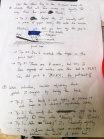 Apocryphal Instructions page 2
 -
 Close up of an ancient hand-drawn diagram by our 3D printing shepherd, Jae


Fun Projects
These are humorous one off projects started for various purposes. Sometimes I think these wiki pages need a little non mean spirited humor.
3D Printer Dear Diary
- This was a humorous attempt at creating a personal teen diary for the 3D printer in hopes that more people would get engaged and participate. It didn't work. I hope I didn't offend anyone by suggesting our type a machine is a brony.